Sharper Need for Speed 4 textures, and the ones the AI got wrong
The AI upscaling from my Need for Speed 4 weekend made most textures sharper and a few worse. How I found the bad ones, and the free tool that came out of it.
In my first post I made a 1999 racer look good on a 4K screen, and the biggest difference came from running its textures through an AI upscaler. Signs, walls and buildings came out much sharper. I mentioned then that the AI sometimes invents detail. Soon after, my own screenshots showed how much.
On Raceway 3 in the rain, the track looked like it was paved with fabric. On Celtic Ruins at night, the grass beside the road had turned into flat strips of colour. Both came from the upscaling.
This post covers what went wrong, how I found the bad textures across the game, and the free tool that came out of it.
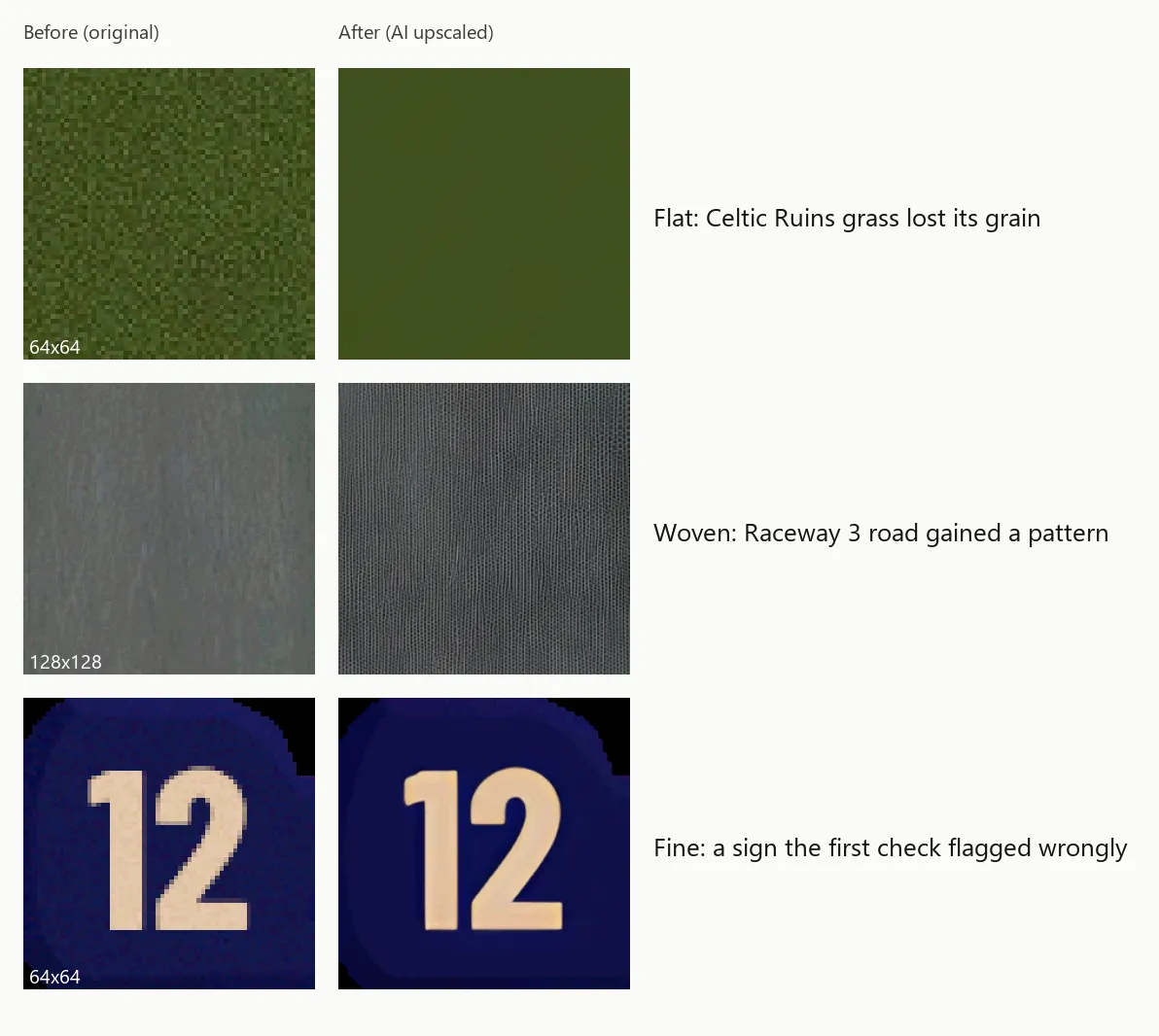
Two ways it goes wrong
The game’s textures are tiny, often only 64 or 128 pixels across. The AI upscaler, Real-ESRGAN, guesses what a sharper version would look like. For clear shapes like letters and bricks it guesses well. For random noise it struggles, and random noise is what grass, dirt and asphalt are made of.
- Woven: on smooth grey asphalt, it decided the noise was a pattern and drew a fine weave over the whole road.
- Flat: on grass and dirt, it decided the grain was noise and wiped it away, leaving almost plain colour.
Up close in a texture viewer, neither looks dramatic. In a race, a woven road looks like corrugated fabric, and flat verges look painted on.
Finding the bad ones
I didn’t want to look through almost 3,000 textures by eye, so I had Claude measure them. For every upscaled texture, it compared the new version with the original by asking one question: how much does the brightness change from one pixel to the next?
Smooth asphalt scores about 1, and real grain in grass and dirt scores 3 to 6. The woven roads jumped to between 9 and 14, and the flat grass dropped below 1. That gives two simple warning signs: a texture that suddenly gets much busier, or one that loses almost all of its detail.
Across the 2,916 upscaled textures in my install, about 220 were flagged. Some of those were in files I hadn’t upscaled myself, such as the HD pack’s own Empire City textures, so they didn’t count. That left 93 different textures to look at by eye. In the end:
- 117 textures across 20 track files went back to their originals. That’s more than 93 because the same texture can appear in more than one file. Raceway 3’s road and Celtic Ruins’ grass were among them.
- 31 flagged textures were fine, or even better: mostly signs and painted graphics. The “12” sign above lost its fuzzy pixels as it came out clean, and the first version of the check mistook that for lost grain.
- Everything else stayed upscaled.
The originals go back at their own small size. That sounds like a step backwards, but the graphics card smooths a small texture as it draws it, and an original shows nothing that isn’t really there.
The tool
Upscaling textures for this game by hand means unpacking each file with FSHTool (a tool from 2002), editing every image and packing it again, one track at a time. A few dedicated modders have done exactly that, and their tracks look lovely: for example Durham Road (higher-res) by TouIchifu and the Summit 4x texture rework by edwardgeo. I couldn’t find anything that does a whole game safely, so I turned my scripts into a free tool: the NFS High Stakes texture upscaler.
From the tool’s folder, one command upscales every track:
python -m nfshs_upscaler upscale --game "D:\Games\NFS4 copy"What it takes care of:
- The 16 MB limit. A texture file can only hold 16 MB of unpacked data. If a file would go over, the tool tries again at a smaller size.
- The game’s own formats. Track textures stay in the game’s 256-colour format, and see-through edges, like the outlines of trees, stay crisp.
- The mistakes above. It measures every texture, flags the woven and flat ones, and draws a before/after sheet of them for you to check. One option puts them back to their originals automatically.
- Undo. It keeps every original file next to the new one and makes a backup on every run, and it can put back a single texture or a whole file.
- Leftovers from older mods. If you installed a remake of a track over the old one, the old track’s “original” file may still be lying next to it. That happened with Snowy Ridge on my install. The tool spots that and leaves the file alone, because undoing it later would bring back the wrong track’s textures.
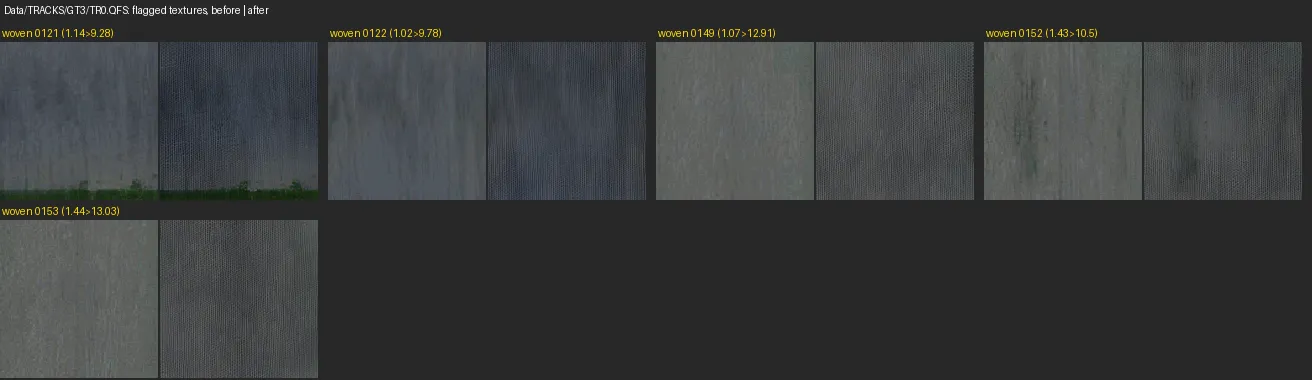
The measurement isn’t perfect. With the improved version that’s in the tool, about one in seven flagged textures turns out to be fine, and a few bad ones slip through. On the 93 textures I checked by eye, it flagged 66, of which 9 were fine, and it missed 5 bad ones. That’s why it shows you the sheet rather than deciding everything itself.
Trying it
You need Windows, a graphics card that supports Vulkan, Python 3.10 or newer, and two free programs the tool uses but doesn’t include: FSHTool by Denis Auroux, and the ncnn-vulkan build of Real-ESRGAN. The README has the steps, and the first release is version 0.1.0. Work on a copy of your game folder, even though the tool keeps backups.
It doesn’t include any game files or textures. It works on your own copy of the game.
How it was made
As with the first post, I worked with Claude Code, an AI coding agent. It wrote the tool, measured the textures and tested its work on copies of my game files. I decided what to build and judged the results.
Before releasing it, we checked the new tool against the PowerShell scripts I’d already raced with. On Hometown, all 225 textures came out at the same sizes, and the colours differed by 0.32 steps out of 255 on a typical texture and by 1.99 on the one that differed most. On Hometown, Raceway 3 and Celtic Ruins, it flagged exactly the same bad textures.
So far it has only been used on my own install, on Windows. It hasn’t been tried on other people’s installs or on Linux, and I haven’t yet raced a track made by this exact version, so treat it as new.
The tool is free under the MIT licence. Bug reports and suggestions are welcome on GitHub.
Credits
- FSHTool by Denis Auroux, which unpacks and repacks the game’s texture files
- Real-ESRGAN by Xintao Wang and others, the AI upscaler
- Hommelwomb’s All in One HD Mod Pack, the base of my install