The kitchen screen that runs our house
A touchscreen on our kitchen wall runs the house: calendar, weather, lights, garden tap, screen time and home brewery, and you can talk to it. What it does and how I built it.
Family life in our house is spread across a shared calendar, five apps and a dozen notifications. Who has football tonight? Is there frost? Is the terrace light still on? We wanted one calm screen in the kitchen that everyone can read at a glance, and talk to.
So there is now a touchscreen laptop on the kitchen wall that runs the house. It shows the family calendar, the weather, the lights, the garden tap, the children’s screen time, our home brewery, who was at the door, and ideas for the weekend. You can talk to it (“Hey Claude, add Leo’s violin concert next Saturday at six”) and it answers out loud. If you let it, it also knows who is standing in front of it and shows you your own view.
Everything runs on the laptop in the house. The only things that leave it are the words of a voice command, which go to Claude, and the searches for weekend ideas.
The screenshots in this post use made-up demo data: a family called Alex, Sam, Mia and Leo, in a place called Lakeview.
What it shows
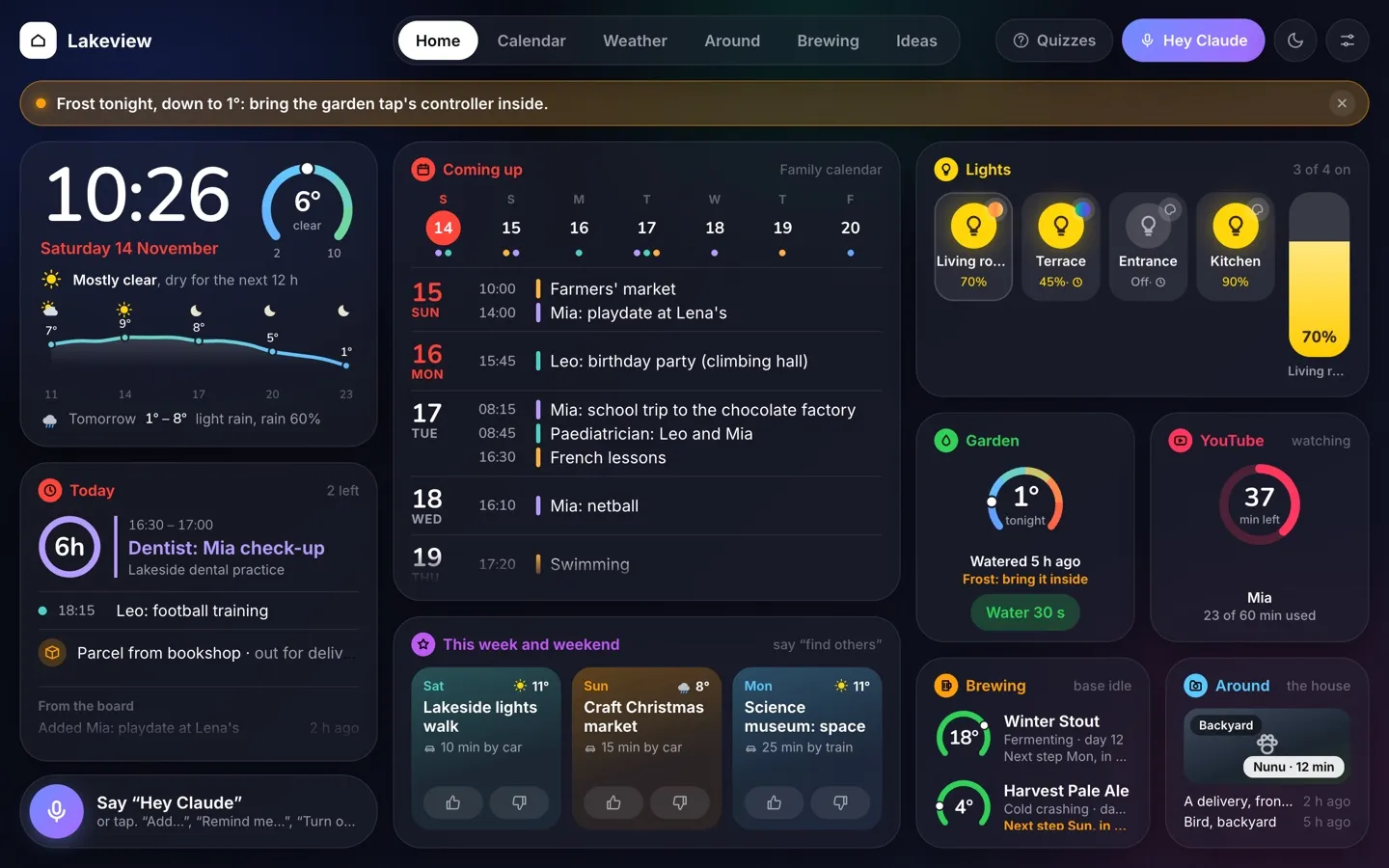
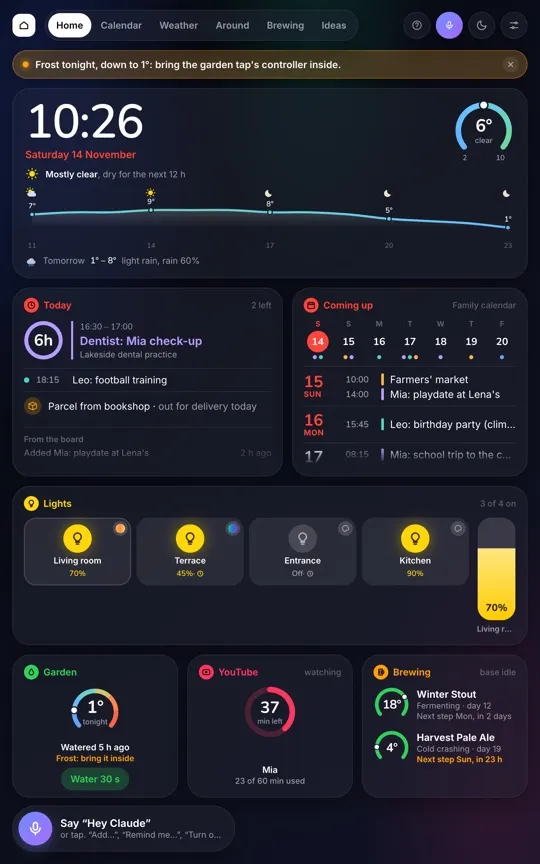
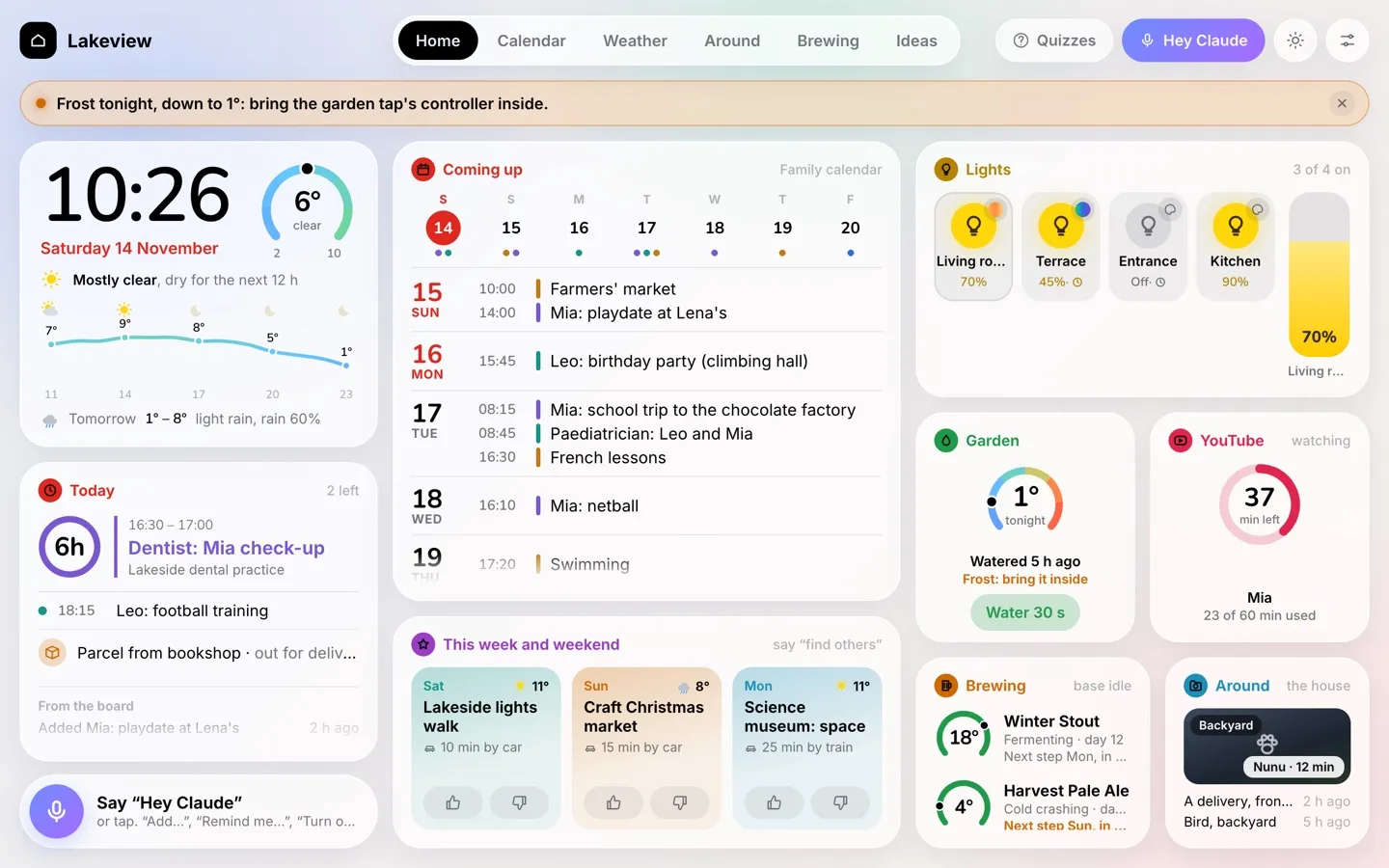
The home screen is made to be read from across the kitchen.
Clock and weather. A big clock, and today’s low to high as a gauge with a dot for now. Below that, the next 12 hours as a temperature line with rain bars, and tomorrow in one line. The forecast comes from Open-Meteo.
Today. The next event, large, with a ring that counts down the hours to it. Then the rest of the day, any parcels on their way (read from our order emails), and what the board itself did recently.
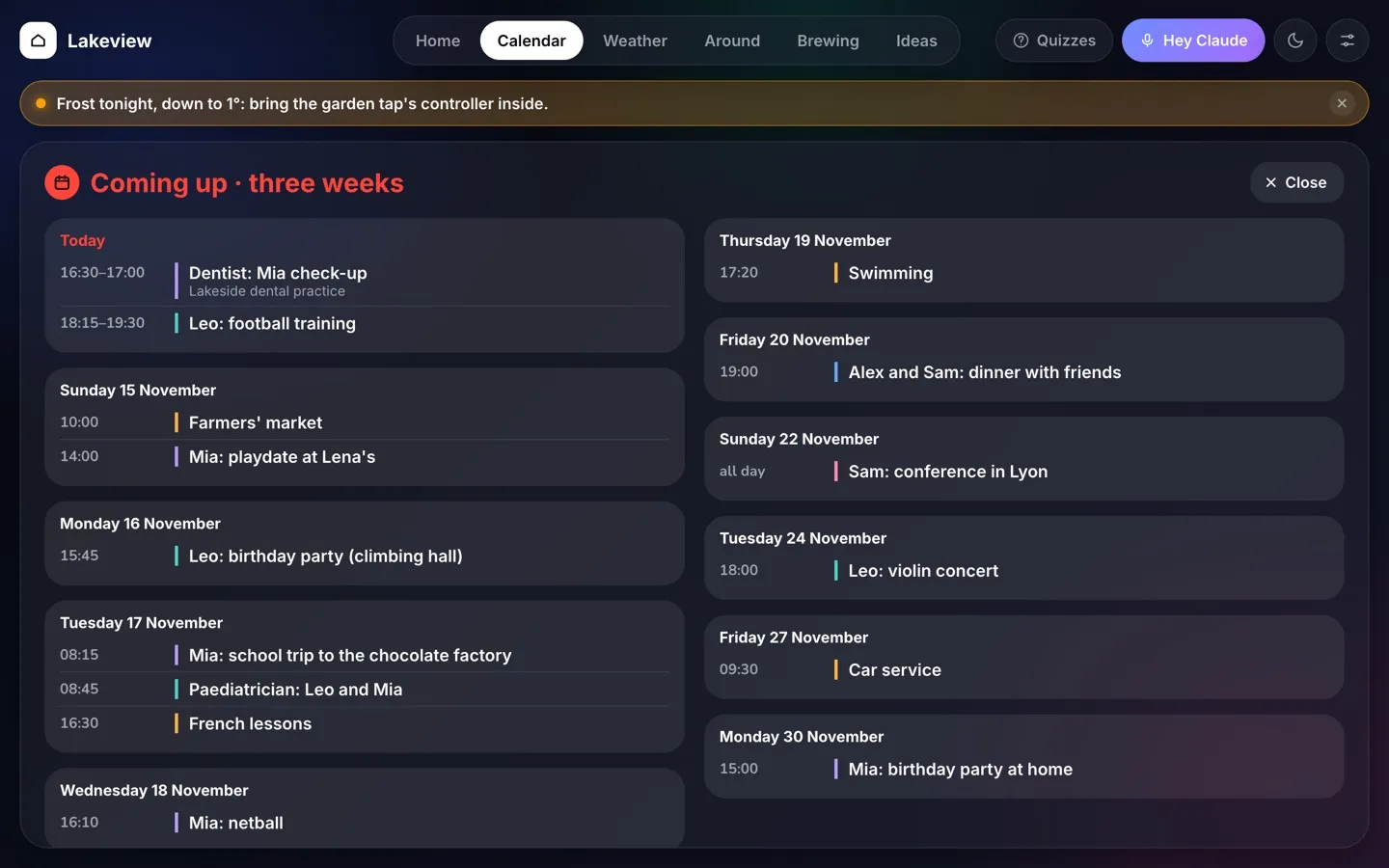
Coming up. A week row, with today in red and a dot for each event in each person’s colour, then the next few days. It all comes from our shared iCloud Family calendar.
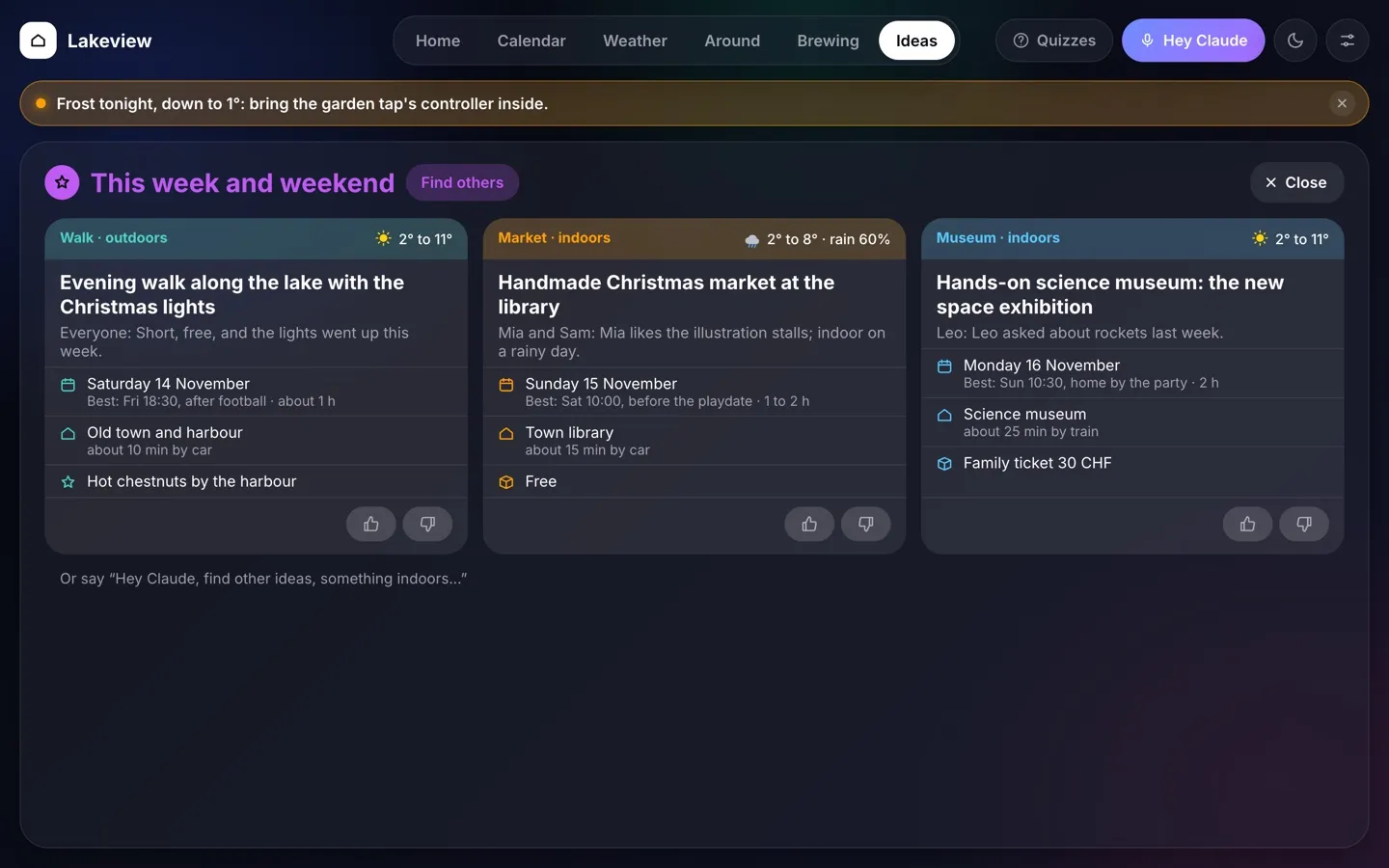
This week and weekend. Three ideas for things to do. Claude finds them with web search and fits them to us: the children’s ages, what we like, the weather and the gaps in our calendar. A thumbs up teaches it, a thumbs down removes an idea for good, and “find others” asks for more.
Lights. A round button per room that you tap to switch, and a tall capsule you drag for brightness, like Apple’s Home app. Some rooms switch on at sunset by themselves.
Garden. Our smart garden tap. It shows the temperature at the tap, warns of frost (“bring it inside”) and has a button for a 30-second burst. Longer watering is in a sheet, and the valve’s own timer always closes it.
YouTube. The children’s daily YouTube allowance on the living-room Apple TV, as a ring like the ones in Apple’s Activity app. It counts minutes, never titles. A parent at the board can add 15 or 30 minutes.
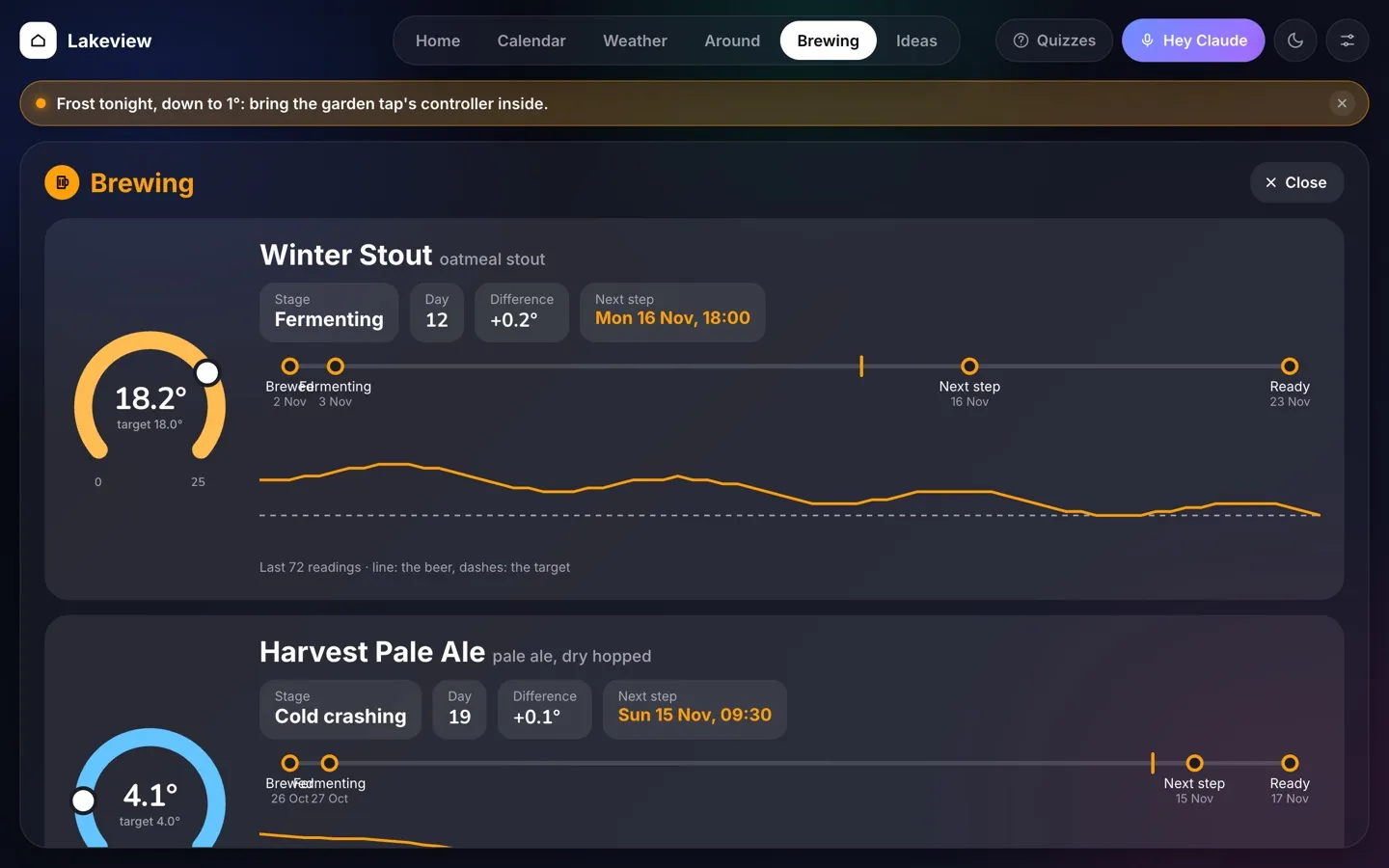
Brewing. Each keg of our home brewery as a gauge, its temperature against the target, with the next step.
Around the house. The latest thing the cameras saw, such as a cat, a delivery or a bird, with the last few below.
Heads-ups. A row under the top bar for things that matter now: frost tonight, a keg that needs attention, someone at the door, icy roads for the school run. Each one is spoken once, and never at night.
Tap a widget or a tab and you get its page: three weeks of calendar, the full weather, the live cameras and the last two days of sightings (family only), the brewery with a timeline and a three-day temperature chart, the ideas in full, and a personal to-do list for whoever the board recognises.
Talking to it
Tap the mic or say “Hey Claude”. The board listens, answers out loud, and keeps listening for a follow-up until there are a few seconds of silence.
It can add or change calendar events, set lights and scenes, leave a message for someone, remember a note and find other weekend ideas. The speech is turned into text on the laptop, and the reply is spoken there too. Claude gets only the text of the command and the next three weeks of the family calendar.
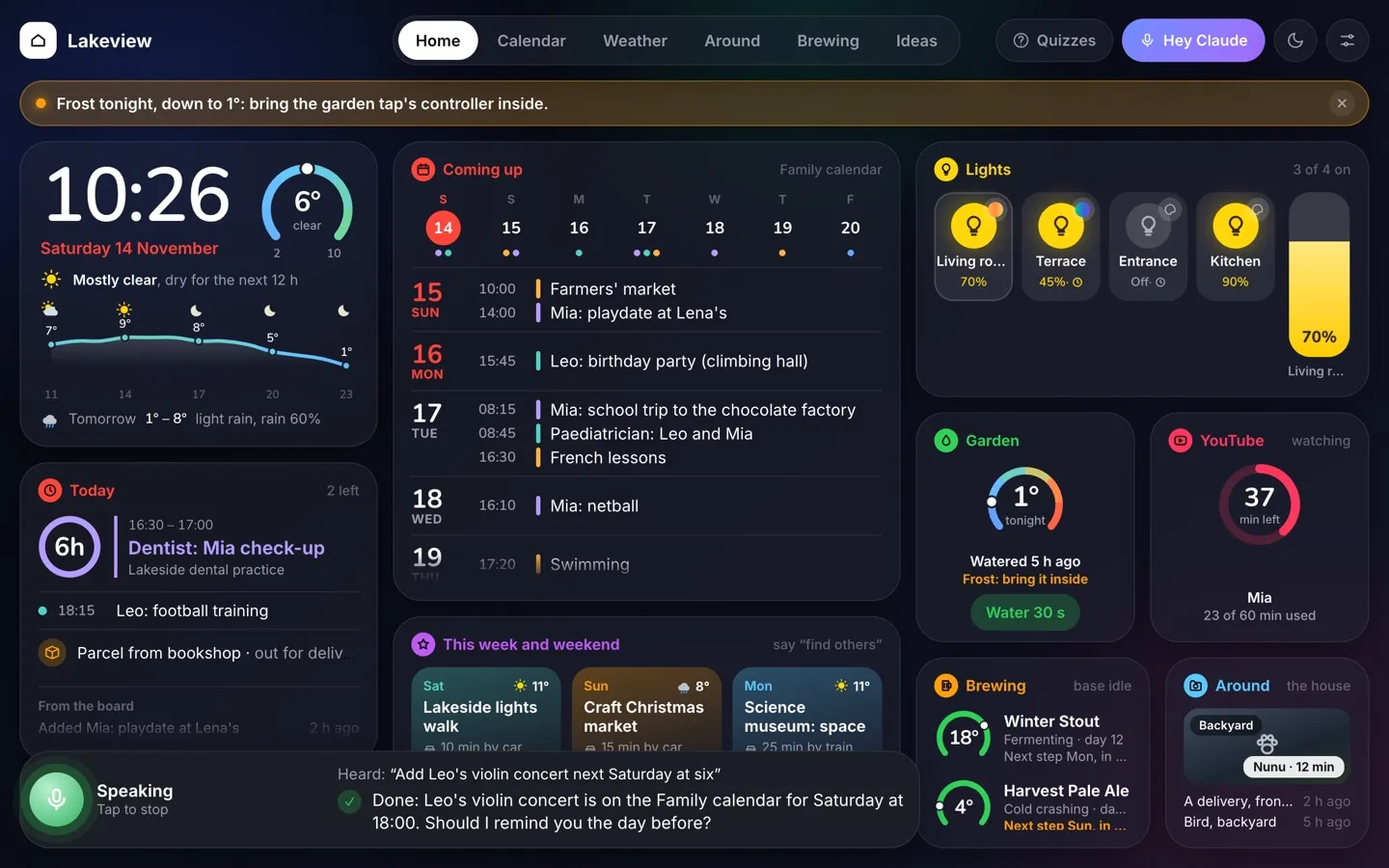
What it can’t do matters as much. It cannot delete anything, because it has no tool for that. Every change it makes is logged with the old values, so a mistake can be put right.
It knows who is there
The board can recognise the person in front of it, if they choose to teach it their face. “Teach me” starts with a consent screen. The board keeps only face measurements, never photos, and “Forget my face” removes them.
Once it knows who is there, it adjusts what it shows to that person, and which voice commands it accepts.
The details that make it useful
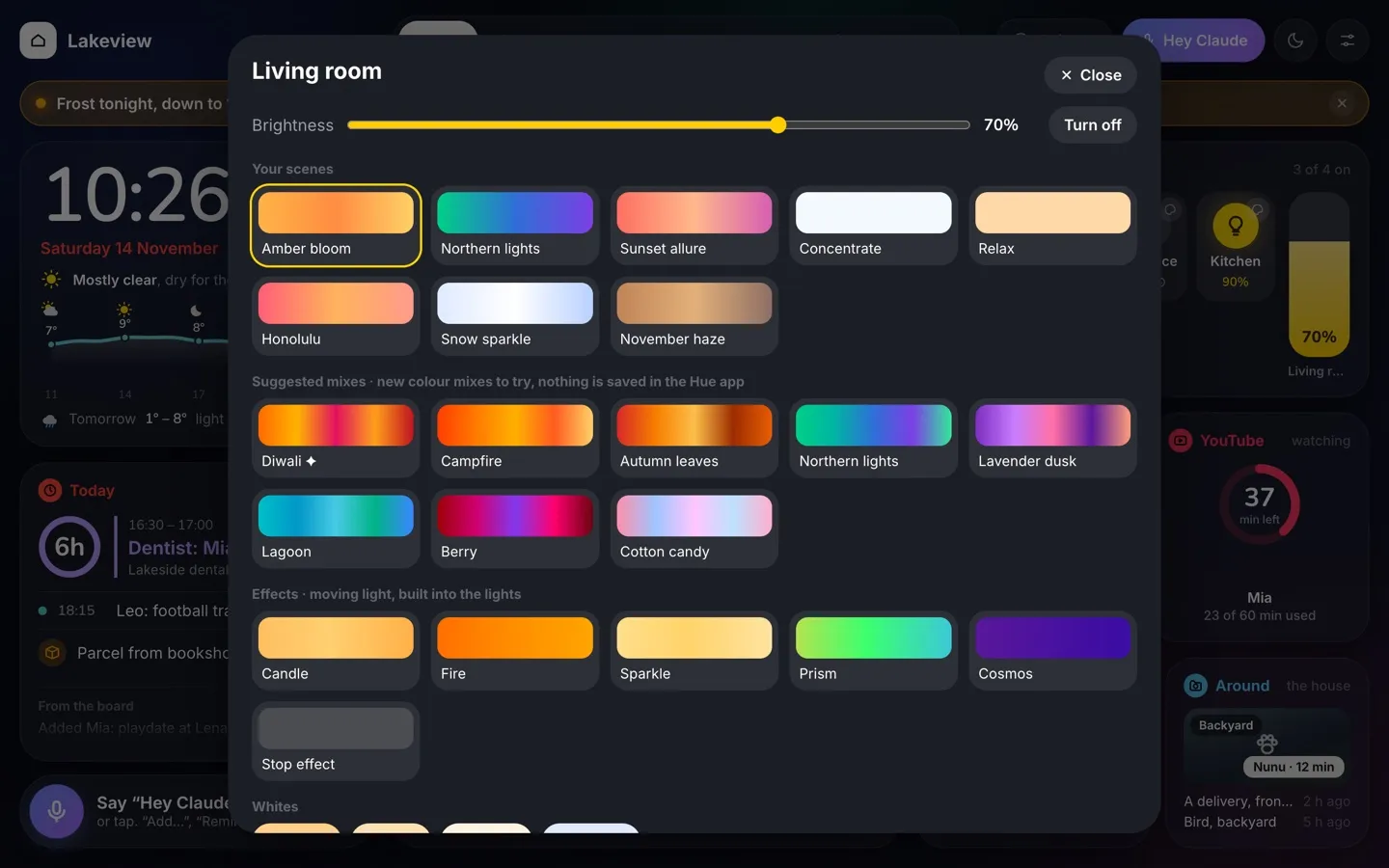
Each room’s lights open a sheet with its Hue scenes, new colour mixes to try and the effects built into the lights. Trying a mix saves nothing in the Hue app.
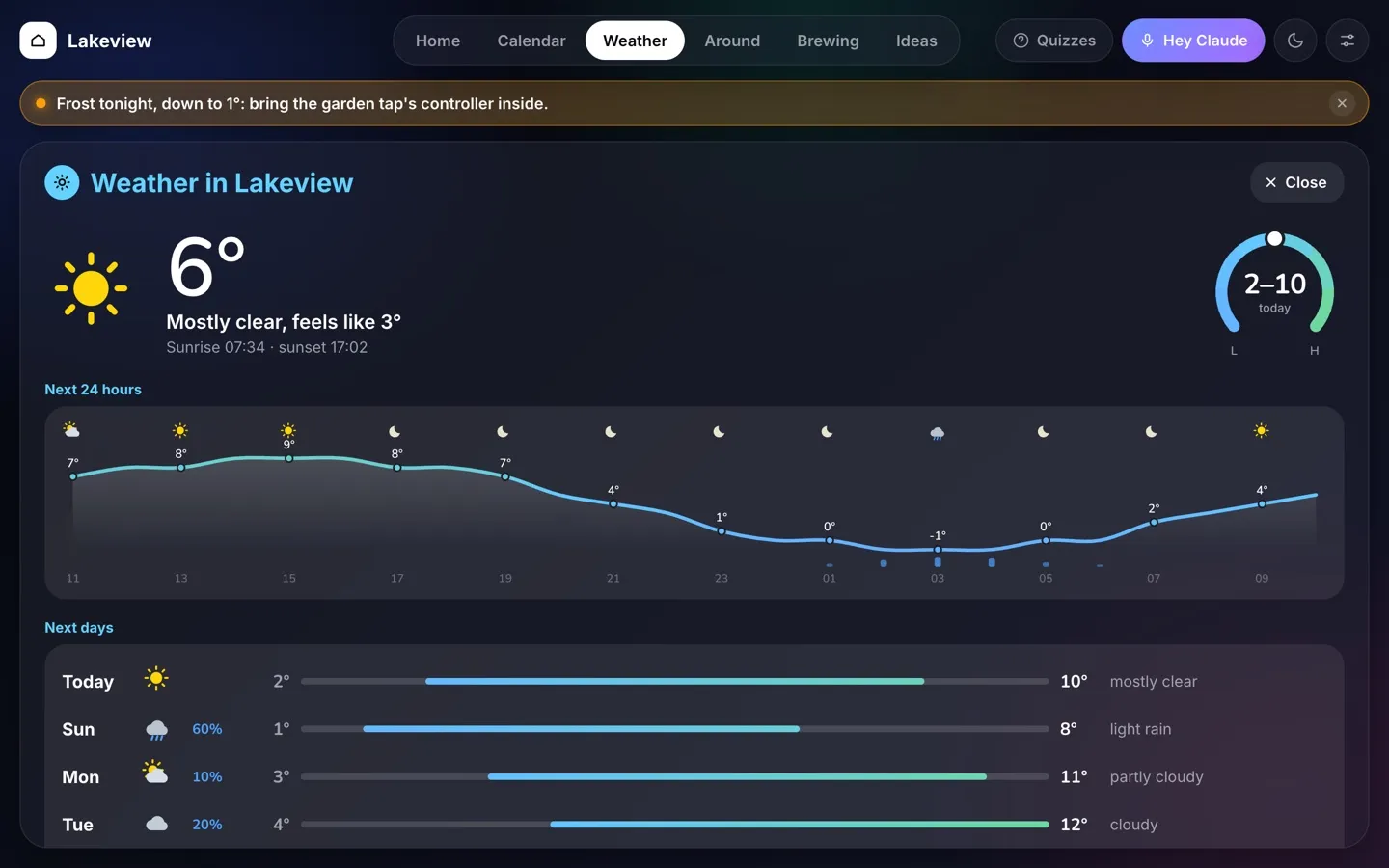
The weather page has the full picture, hour by hour and day by day.
The calendar page looks three weeks ahead.
The brewing page follows each keg from brew day to ready.
And the ideas page has each suggestion in full: the best time for it around our plans, how to get there and a tip.
A few behaviours matter as much as any widget:
- Night mode. From 22:30 the screen dims to 4%. A face, a tap or “Hey Claude” wakes it.
- Weekend mode. School and after-school activities are hidden until the next school day.
- School mornings. A card with the weather and warnings for the school run, each child’s lessons, what to bring and what is due.
- Quizzes. A tab opens a quiz portal with revision quizzes for school.
The tech and the setup
The screen is an old laptop, a 13-inch touchscreen convertible, fixed to the wall. It runs Ubuntu 26.04 LTS with Firefox in kiosk mode and stays on all the time. Turn it, and the layout switches to portrait.
The rest of the setup:
| Part | What and how |
|---|---|
| Server | One small Python web server (standard library only) and a handful of systemd services. LAN only: it accepts commands only from the home network. |
| Front end | Svelte 5 and Vite. One fixed 1280 × 800 canvas, scaled to the screen. Every widget is a small component, and the layout is pure CSS. |
| Calendar | The iCloud Family calendar, over CalDAV. |
| Weather | Open-Meteo. |
| Lights | A Philips Hue bridge, through its local API. No cloud. |
| Garden | A GARDENA smart Water Control, through the GARDENA gateway’s local API. |
| Screen time | The Apple TV, read locally with pyatv: minutes of YouTube, and a pause at the limit. |
| Cameras | Nest cameras, streamed locally with go2rtc. A local detector runs on the laptop’s Intel graphics with OpenVINO: YOLO11, MegaDetector for animals (night infrared included), and CLIP as a second opinion. |
| Brewing | A MiniBrew home brewery, read by a small logger. |
| Speech to text | Whisper, the small model, on the laptop. |
| Understanding | Claude, through the Anthropic API, with the Haiku model and a small set of tools: add an event, change an event, set lights, remember a note, leave a message. |
| Voice | Kokoro text-to-speech on the laptop, in English and French. A short reply takes about two seconds to speak. |
| Wake word | openWakeWord, with an open “Hey Claude” model. |
| Faces | OpenCV: YuNet finds faces, SFace matches them. Opt-in, measurements only. |
| Weekend ideas | Claude with web search, a few times a week. |
Replaying saved pictures through the camera detector cut its false alarms from 15 out of 80 to none.
What stays in the house
A screen that sees and hears the family has to be careful. These are the choices I made:
- Everything runs in the house. No video clips are kept, and camera snapshots older than 30 days are deleted.
- The detector never says who a person is. Only the family can label a sighting, as “a delivery” or “a neighbour”.
- Live cameras and photos of people show only on the board’s own screen, and only while one of the family is recognised there. Never on another device.
- Faces are opt-in, kept as measurements and not photos, and can be removed at any time.
- Screen time is counted in minutes, never by what was watched.
- The voice assistant has no delete tool, and every action it takes is logged with what it changed.
The design
The board went through three versions in two weeks.
The first, at the end of October, was cards in three columns. It worked, but it grew busy as features arrived.
The second, on 13 November, put frosted-glass panels on a soft gradient, after a smart-home design I liked. It looked better, but it was still one big hand-written script, and small fixes kept breaking other views.
The third, on 13 and 14 November, is a rebuild in Svelte, inspired by Apple Watch apps, because they show a lot in a small space. It has open-arc gauges with a dot for now (the weather, the garden tap, the kegs), Activity-style rings (screen time, the countdown to the next event), round Home-app buttons with a capsule brightness slider, the Calendar app’s week row, and one colour per app for its name and its gauges. The top bar now stays on every page, and heads-ups get their own row instead of covering things. There is a light mode and a dark mode.
One lesson is worth passing on. The old board measured its own cards in script and trimmed them to fit, which is why things kept going missing or overlapping. The new one lets CSS do the layout and never measures anything.
How it was built
I built it with Claude Code over about two weeks of evenings. I describe what I want, sometimes with a screenshot of a design I like. Claude writes the code, tests it against the house’s live data in a preview where nothing can switch on or off, and deploys it to the laptop.
That preview matters, because the board controls real things. A change can be tried on the real calendar and sensors without a light or the garden valve moving.
The Apple Watch redesign went from idea to live in one day.
Still evolving
The board keeps changing as we live with it. Two things are already under way. The family is recording “Hey Claude” samples, through “Teach my voice”, so the board can learn our own voices. And the children’s revision quizzes keep growing.